ERPBridge V2 architecture: declarative control plane
ERPBridge V2 adopts a Declarative Control Plane architecture, inspired by Kubernetes. This design moves away from static, file-system-bound configurations toward a live API-managed resource system for MCP tools.
High-level overview
The system is divided into three distinct layers:
- Management Layer (The CLI): Developers use
bridgectlto declare the desired state of the system by "applying" YAML/JSON resource definitions. - Control Plane (The Server): A centralized API server stores tool definitions in a persistent SQLite database, validates them against strict admission rules, and manages versioning.
- Runtime Layer (MCP Engine): A background reconciliation controller keeps the active MCP server aligned with the desired state in the database.
Visual architecture
The detailed view shows the control plane, MCP access, plugin integration, and the protected connections to ERP and external services.
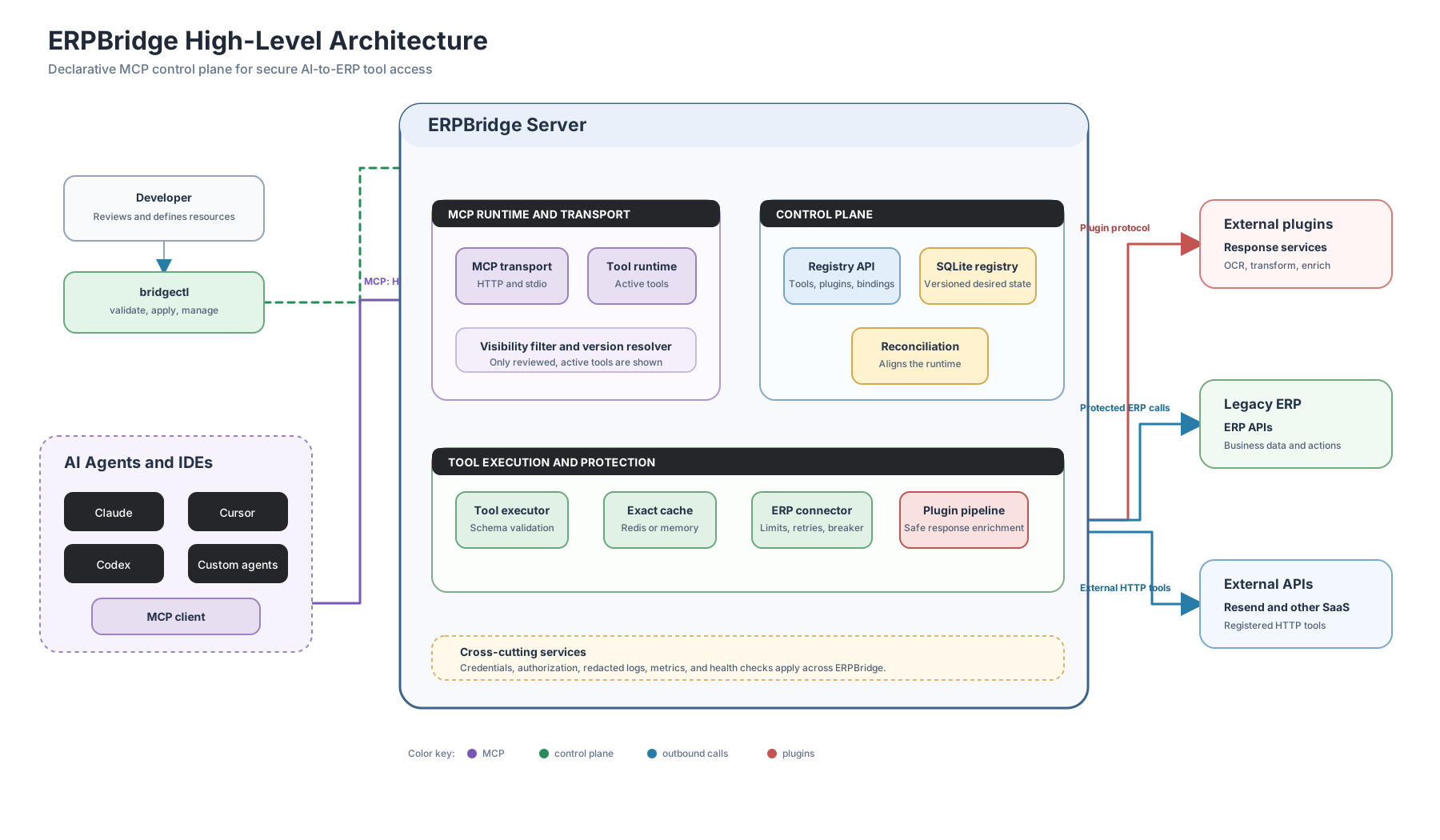
Presentation overview
Use this simplified view to explain ERPBridge to a non-technical audience. Developers choose the tools. AI agents use those tools. ERPBridge connects the business systems.

Endpoint and tool: key concepts
One of the most important concepts in ERPBridge V2 is the distinction between registering an API Endpoint and applying an MCP Tool.
| Feature | API Endpoint (api register) | MCP Tool (tool apply) |
|---|---|---|
| Mental Model | Technical Discovery | Declarative Management |
| Primary Focus | The ERP System (technical) | The AI Agent (semantic) |
| Storage | Context-scoped local registry (~/.bridgectl/registries/<context>.json) | Server Registry (erpbridge.db) |
| Visibility | Hidden from AI | Visible to AI (as an MCP Tool) |
| Stability | Experimental / Internal | Versioned / Stable |
| Command | bridgectl api register ... | bridgectl tool apply -f ... |
Why separate them?
- Technical vs. Semantic: A single ERP API endpoint (e.g.,
/api/v1/resource/Employee) might be used by multiple MCP tools with different filters or versions. - Safety: Registering an API is a developer-only technical step. Applying a tool is a conscious decision to expose functionality to an AI agent.
- Lifecycle: You can "discover" and test 100 API endpoints locally, but only "apply" the 5 that are safe and ready for the LLM to use.
Core components
1. Tool resource registry (the source of truth)
Instead of loading files from a directory, the server maintains an internal Tool Registry backed by SQLite. This registry stores multiple versions of the same tool, allowing for safe rollouts and rollbacks.
Each admitted name and version is immutable executable content identified by a canonical SHA-256 digest and server-authored admission record. Changed content requires a new version. IsActive controls exact execution eligibility. IsServing selects the active revision used by future unqualified calls. Soft deletion retains the resource but removes execution authority.
2. Version resolver and invocation snapshot
An unqualified request such as list_employees selects the operator-controlled serving revision, not the highest semantic version. Every active revision is also exposed through a protocol-safe exact name. A client can bind an unqualified call with the digest in MCP _meta; exact requests never fall forward.
ERPBridge clones the selected resource before schema validation and middleware construction. Validation, authorization, ERP mapping, revision-scoped caching, response processing, and output use that snapshot if the serving pointer changes concurrently.
3. Visibility filtering (JSON-RPC interception)
Because the underlying MCP runtime does not always support dynamic removal of tools from an active session, ERPBridge implements a Visibility Filtering Layer.
- The Problem: Once a tool is registered in memory, standard libraries often provide no way to "unregister" it without a restart.
- The Solution: ERPBridge wraps the MCP server's HTTP handler and intercepts the
tools/listresponse. Before the JSON-RPC result reaches the client, ERPBridge parses the list and removes any tools marked asIsActive = falsein the internal registry. - Result: The client receives a truthful list of tools. The list matches the desired state of the control plane. This works even when the underlying runtime still knows the "ghost" tools.
4. Final execution authority and target origin
Immediately before connector entry, ERPBridge validates the final effective request origin against the origins bound at admission. This includes ERP_BASE_URL rewrites. The authority boundary forces the production connector to return redirect responses without following them.
Withdrawal and connector commitment share one process-local synchronization boundary. Withdrawal first prevents connector entry. Connector commitment first lets that call complete before withdrawal is acknowledged. This is not a distributed-revocation guarantee. Protected cache-hit revocation requires a separate release check and is outside this boundary.
5. Reconciliation controller
The server runs a background reconciliation controller. It keeps the in-memory MCP registry in sync with the SQLite database.
The controller runs every 10 seconds. It compares the database state against the desired state:
- If a tool exists in SQLite but not in the registry, the controller registers it.
- If a tool is inactive (soft-deleted) or missing from SQLite, the controller deregisters it from the MCP runtime.
- If a tool changes, the controller re-registers the new version.
Each check uses a SHA-256 state hash over ordered tool, plugin, and binding identity, activity, update timestamp, and stored resource data. If the hash is unchanged, the controller skips the pass. This keeps the check cheap.
The authenticated /api/info response exposes process-local reconciliation attempt count, last attempt, last success, safe error state, desired-state hash, observed generation, and convergence. Desired resources and soft-delete tombstones remain durable in SQLite; cycle timestamps and counters reset with the process. The periodic scan continues after failed intervals and can converge when dependencies recover without a restart.
When the registry changes, the controller sends the notifications/tools/list_changed notification to all active MCP sessions.
The controller also runs immediately after a tool apply HTTP request. The tool is visible to agents right after apply. It does not wait for the next 10-second tick.
External response plugins
ERPBridge invokes an externally operated HTTP plugin. The control plane stores the endpoint and exact release, but never installs, starts, upgrades, or schedules plugin code.
A PluginBinding connects one exact plugin version to one exact tool version.
A raw_response binding runs first and receives a bounded ERP response with
status, normalized content type, and a tagged JSON or base64 body. It can adapt
media, such as an ERP image to OCR text. The plugin cannot change status or
receive ERP headers, URLs, credentials, caller identity, or original arguments.
The developer owns the final object-shaped MCP output schema; plugins never
change it dynamically. An incompatible output meaning requires a new
MCP-visible tool name and exact tool version.
For successful responses, the fixed order is:
Terminal non-2xx responses can be inspected by raw plugins while retaining ERP retry and circuit-breaker accounting. They remain errors, including 3xx, and skip success-only normalization and after-response processing.
The pipeline runs only on cache misses. The cache stores the final transformed
MCP result and never stores an error result, so cache hits bypass ERP and
plugins. Plugin or binding lifecycle changes flush affected tool cache entries.
continue uses the original captured response only when it satisfies the final
schema; otherwise it returns a safe error. Use fail for media conversion
unless a compatible fallback is known.
Plugin resources support api and docker metadata types; both describe an
external deployment. ERPBridge does not own plugin images or their lifecycle.
Credentialed calls support bearer and API-key headers only. A credentialRef
is an environment-variable name with a PLUGIN_ prefix; the resolved value is
read at request time and is never persisted or logged. Credentialed endpoints
require HTTPS, except for exact development-only host:port entries in
INSECURE_AUTH_ALLOWED_HOSTS, and exact endpoint admission in
PLUGIN_ENDPOINT_ALLOWLIST. Raw bindings require the allowlist even without
plugin authentication, plus authenticated admin admission and an explicit
object-shaped tool schema. Redirects, URL userinfo, raw secrets, and broad
wildcards are not accepted.
Tool generation and templating
ERPBridge uses a "Template-Based Generation" approach. When generating tools (especially in bulk from OpenAPI):
- The Template: A
Registered APIacts as the source of technical truth (URL, Auth, Module). - The Spec: An
OpenAPI Definitionacts as the source of semantic truth (Paths, Parameters, Descriptions). - The Result: The generator merges these, creating production-ready MCP tools that are pre-configured with your environment's connectivity and security settings.
Use the same OpenAPI specification to generate tools for different environments (Dev, Staging, Prod). Point the generator to a different registered API.
Generation is pure until an explicit output or apply operation. The reviewed
manifest under manifests/<module>/ is the single applied source; generated
YAML is a temporary draft and does not create a competing schemas/ tree or
per-tool JSON authority. CLI control-plane calls use the configured host root;
only the exact /mcp or /mcp/ transport suffix is normalized away. The
/mcp/ endpoint itself remains the Streamable HTTP MCP transport.
Lifecycle of a tool change
- Define: Developer creates a V2 YAML schema for a new tool.
- Validate: Runs
bridgectl tool validate -f tool.yamlto check for syntax and admission rules (e.g., no raw secrets). - Apply: Runs
bridgectl tool apply -f tool.yaml. - Store: The ERPBridge API validates the payload again and saves it in the SQLite
toolstable. - Reconcile: The background controller detects the new DB entry and registers it with the
mcp-goruntime. - Execute: AI agents now see the new tool and can invoke it immediately.
Security design
- Secret decoupling: Schemas and plugin resources never contain raw tokens or keys. They contain only a
credentialRef; the middleware resolves it from the environment at request time. Legacy local API registries require an explicit scrub before state changes continue. - Transport Admission: Credentialed ERP and plugin endpoints require HTTPS, except exact development-only
host:portentries. Plugin endpoints also require exactPLUGIN_ENDPOINT_ALLOWLISTmembership. Userinfo and redirects cannot be used to bypass the policy. - Admission Controllers: The API server rejects suspicious endpoint content, unknown authentication fields, reserved headers, raw-secret-looking values, and invalid credential references.
- Redaction: All logs produced by tool executions are automatically filtered to redact sensitive keys defined in
internal/types/sensitive.go; ERP request and response bodies are not logged. - Deployment Boundary: ERPBridge stores plugin configuration and invokes the protocol, but does not install, start, update, or schedule plugin code.
- Structured failures: Control-plane HTTP errors use bounded
error,message,suggestion, and numericcodefields. Stable identifiers such asVALIDATION_FAILED,AUTHORIZATION_DENIED,UPSTREAM_UNREACHABLE, andAPI_PROBE_FAILEDprovide recovery keys without exposing upstream bodies. - Sensitivity admission: Tools may declare
security.dataClassaspublic,internal,pii, orrestricted; the latter two require opaqueallowedRoles. Development-onlysystem.*_testtools are gated, and RedisInsight is loopback-only by default.